See you in Amsterdam !
From Blender to any OSL Renderer, and Back !
What about an OSL drink ?
Affichage des articles dont le libellé est VRay. Afficher tous les articles
2018/09/01
From blender to any OSL Renderer, and back !
Libellés :
3D,
3DSMax,
Appleseed,
Arnold,
Autodesk,
Blender,
Blender Conf,
Chaosgroup,
Clarisse,
Cycles,
Isotropix,
Open Shading Language,
OSL,
Pixar,
Renderman,
Shader,
Solid Angle,
VRay
2018/04/11
OSL in Autodesk 3DSMax 2019
This is the very good news of the latest 3DS Max release, from Autodesk.
An OSL pattern generator is now included in 3DS Max 2019 !!!
It is awesome ! It can export to bitmap, for non-OSL renderer. Shaders are fully intergrated in OSL renderers, like Arnold.
It's optimisation is not done shader by shader, but for the whole node tree. So many little shaders would go as fast as a very big one doing the same thing! That's Excellent!
Other nice things: you can edit and compile OSL scripts inside 3DS Max, or even link them to your scene (or unlink to file, in 3DS Max terminology)!
Indeed, I just have one thing to say...
In 2012, Blender was the first to do all of this!
Brecht Van Lommel did a wonderful job on OSL integration in Cycles, as he did a wonderful job for Solid Angle Arnold.
For now 6 years, we use Blender for easy OSL dev., using included script editor, realtime render update, etc...
And, most impressive, Blender is still ahead! It includes closures and other advanced OSL functions not yet available in 3DSMax.
I started teaching OSL using Blender in 2013. Students were wondering why... Now, they are immediately proficient in writing OSL Shaders in 3DS Max 2019, from the first day!
Now, they can use their knowledge in the biggest and most powerful renderers !
Just because I started teaching OSL 5 years ago !
Long time before this standard was widely available, long time before autodesk decide that it's should be included in mainstream softwares, I was teaching OSL on Blender, Maya and 3DSMax (yes! 3DS Max!) for years!
Because, when your are teaching, you should NOT teach what exists now. You should NOT answer the actuel needs.
You have to teach what will exist when the students will leave school.
You have to teach what will be needed in the next 2, 3 or 10 years!
If you do so, your students will adapt themselve immediately to new technologies! Because they try them before all others.
And Blender is a wonderful tool for this goal.
So, if you are teacher, remeber this :
Go boldly where no human has gone before !
OSL in 3DS Max is the perfect illustration of this story!
An OSL pattern generator is now included in 3DS Max 2019 !!!
It is awesome ! It can export to bitmap, for non-OSL renderer. Shaders are fully intergrated in OSL renderers, like Arnold.
It's optimisation is not done shader by shader, but for the whole node tree. So many little shaders would go as fast as a very big one doing the same thing! That's Excellent!
Other nice things: you can edit and compile OSL scripts inside 3DS Max, or even link them to your scene (or unlink to file, in 3DS Max terminology)!
Indeed, I just have one thing to say...
In 2012, Blender was the first to do all of this!
Brecht Van Lommel did a wonderful job on OSL integration in Cycles, as he did a wonderful job for Solid Angle Arnold.
For now 6 years, we use Blender for easy OSL dev., using included script editor, realtime render update, etc...
And, most impressive, Blender is still ahead! It includes closures and other advanced OSL functions not yet available in 3DSMax.
I started teaching OSL using Blender in 2013. Students were wondering why... Now, they are immediately proficient in writing OSL Shaders in 3DS Max 2019, from the first day!
Now, they can use their knowledge in the biggest and most powerful renderers !
Just because I started teaching OSL 5 years ago !
Long time before this standard was widely available, long time before autodesk decide that it's should be included in mainstream softwares, I was teaching OSL on Blender, Maya and 3DSMax (yes! 3DS Max!) for years!
Because, when your are teaching, you should NOT teach what exists now. You should NOT answer the actuel needs.
You have to teach what will exist when the students will leave school.
You have to teach what will be needed in the next 2, 3 or 10 years!
If you do so, your students will adapt themselve immediately to new technologies! Because they try them before all others.
And Blender is a wonderful tool for this goal.
So, if you are teacher, remeber this :
Go boldly where no human has gone before !
OSL in 3DS Max is the perfect illustration of this story!
2017/09/17
Giant LED Screen, an OSL shader for every renderer
The Giant LED Screen shader is an OSL shader used for teaching how to adapt shaders for any OSL compatible renderers.
The shader is rather complex. It is using object individual ID, distance to the camera, U and V quantization, and emission.
Making a version for each rendering software is not easy, as a lot of this features change fron one renderer to another. Indeed, it is a really good exercise for teaching portability !
Tested versions are for :
- ARNOLD (Solid Angle), for 3DSMax and Maya.
- Clarisse IFX ( Isotropix)
- Cycles, for Blender.
- Renderman (Pixar), Renderman 21.5 for Maya.
- Vray for 3DS Max (Chaosgroup)
If I have opportunity to try to adapt it to other renderers, I would update this post.
Shader features are :
: Simulate LED and local led glow
: LED visibility according to camera distance. This is very useful for having a total moiré control.
: Simulation of dead pixels and led chunk visibility and non uniformity.
: Screen color, useful for road sign...
: Slideshow of up to 10 pictures, with fading as transition.
: random pictures on each object, so no screens in the scene are identical.
: base luminosity of the screen
Enjoy !
The shader is rather complex. It is using object individual ID, distance to the camera, U and V quantization, and emission.
Making a version for each rendering software is not easy, as a lot of this features change fron one renderer to another. Indeed, it is a really good exercise for teaching portability !
Tested versions are for :
- ARNOLD (Solid Angle), for 3DSMax and Maya.
- Clarisse IFX ( Isotropix)
- Cycles, for Blender.
- Renderman (Pixar), Renderman 21.5 for Maya.
- Vray for 3DS Max (Chaosgroup)
If I have opportunity to try to adapt it to other renderers, I would update this post.
Shader features are :
: Simulate LED and local led glow
: LED visibility according to camera distance. This is very useful for having a total moiré control.
: Simulation of dead pixels and led chunk visibility and non uniformity.
: Screen color, useful for road sign...
: Slideshow of up to 10 pictures, with fading as transition.
: random pictures on each object, so no screens in the scene are identical.
: base luminosity of the screen
Enjoy !
2017/04/19
OSL Juggler everywhere !
Well, not exactly everywhere...
Unfortunately, I don't have access to all renderers of my OSL Renderer BIG LIST.
So, I tried to adapt my OSL Juggler, based on 1986 Eric Graham's 3D Juggler, to OSL compatible renderers I could use.
Despite including a full ray tracing renderer in itself, the OSL Juggler Shader is rather simple. It just use I and P variables, in world coordinate system, and the emission() closure.
The main adaptation was Y up and direction of I.
You can find :
Juggler for Blender
Juggler for Renderman
Juggler for Arnold + 3DSMax 2018
Juggler for Arnold + Maya
Juggler for Vray Max and Maya
Juggler for Isotropix Clarisse IFX
Juggler for Appleseed, Blenderseed and Maya
If you want an adaptation of the Juggler for your Renderer, email me.
Then, send me a link to download an useable version of your software (at least for 30 days...) and to some documentation of how to include an OSL shader.
I'll contact you if I would find any problem.
The OSL Juggler shader doesn't use advanced OSL fonctions (not getattribute, no trace, etc...), so it could work on any software using OSL.
Enjoy playing with the 1986 Erci Graham's JUGGLER! The animation that changed the world of 3D forever...
Unfortunately, I don't have access to all renderers of my OSL Renderer BIG LIST.
So, I tried to adapt my OSL Juggler, based on 1986 Eric Graham's 3D Juggler, to OSL compatible renderers I could use.
Despite including a full ray tracing renderer in itself, the OSL Juggler Shader is rather simple. It just use I and P variables, in world coordinate system, and the emission() closure.
The main adaptation was Y up and direction of I.
You can find :
Juggler for Blender
Juggler for Renderman
Juggler for Arnold + 3DSMax 2018
Juggler for Arnold + Maya
Juggler for Vray Max and Maya
Juggler for Isotropix Clarisse IFX
Juggler for Appleseed, Blenderseed and Maya
If you want an adaptation of the Juggler for your Renderer, email me.
Then, send me a link to download an useable version of your software (at least for 30 days...) and to some documentation of how to include an OSL shader.
I'll contact you if I would find any problem.
The OSL Juggler shader doesn't use advanced OSL fonctions (not getattribute, no trace, etc...), so it could work on any software using OSL.
Enjoy playing with the 1986 Erci Graham's JUGGLER! The animation that changed the world of 3D forever...
Libellés :
3D,
3DSMax,
Appleseed,
Arnold,
Autodesk,
Blender,
Chaosgroup,
Clarisse,
Cycles,
Isotropix,
Maya,
Open Shading Language,
OSL,
Pixar,
Renderman,
Shader,
Solid Angle,
VRay
OSL Juggler for VRay
----------> JUGGLER for VRay(Chaosgroup) for 3DSMax(Autodesk) and for VRay for Maya(Autodesk):
You can download the VRAY for MAX shader HERE.
You can download the VRAY for MAYA shader HERE.
Warning : The VRay for Maya shader has NOT be tested!
Use a VRayOSLTex node to load the shader, than connect it to a VRay material (VRayLight works fine).
I prefered using an OSL texture, so it compatible with VRAY, VRay RT, Activeshade and IPR.
2017/04/10
1st Quarter 2017 OSL workshops and teaching reel
This first quarter 2017 OSL teaching session, at ESTEI school, was really nice, with cool results.
Here is the reel of works done during worshops, teaching session, or tutored works.
The shaders are 'as is' from students work, with no correction. Some little glintches are still present, but I prefer showing real student works instead of modified (and without bug) ones.
If you are intersted in OSL workshops, or sessions, or masterclasses.... just send me a message !
Enjoy !
Here is the reel of works done during worshops, teaching session, or tutored works.
The shaders are 'as is' from students work, with no correction. Some little glintches are still present, but I prefer showing real student works instead of modified (and without bug) ones.
If you are intersted in OSL workshops, or sessions, or masterclasses.... just send me a message !
Enjoy !
OSL Shader Writing Courses, 1st quarter 2017, Students Works Reel from François Gastaldo on Vimeo.
2016/11/11
OSL Renderers Big List !!!
It's very difficult to find a complete list of renderers including Open shading Language.
I need it for OSL teaching and for my OSL Master-Class, so I made it myself !
I could miss some. If you don't find your Rendering software here, please, write a comment.
Some renderers have different features according the 3D software hosting it. So, I just list the ones including OSL.
It is very difficult to make this list, as the OSL implementation could be very different. In some case, it is even hidden to the final user (like in Corona for Maya). In other cases, there is no end-user interface for compiling the .osl shader (should be compiled by oslc before using it). Some are so poorly documented that it is near impossible to use.
I decided to make just six categories, mostly useful to end-user.
I didn't made Commercial vs Open source categories neither.
It could be very useful to make compatibility charts between renderers and OSL specification, but it's not the goal of this post.
This post is evolutive, according to renderers actualities.
This post is up to date the 12 / 04 / 2018, list version: 8.1
Full OSL renderers, with compilation UI
Closure + texture pattern,
ready to use,
in-software OSL compilation.
-> Autodesk 3DS Max 2019 with Arnold Renderer included
------------------> OSL Documentation
-> Autodesk MAYA 2018+ with Arnold Renderer included
------------------> OSL Documentation
-> 3delight for Katana
------------------> OSL Documentation
-> Cycles in Blender
------------------> OSL Documentation
-> Cycles4D, Cycles for Cinema 4D
------------------> OSL Documentation
-> Vray for 3DSMax
------------------> OSL Documentation
-> Vray for Cinema4D
------------------> OSL Documentation (for full documentation, read documention of VRay for 3DS-Max)
-> Vray for Maya
------------------> OSL Documentation (very poor...)
-> Autodesk Beast
------------------> OSL Documentation
-> Arnold Render Standalone and API
------------------> OSL Documentation
Full OSL renderers
Closure + texture pattern,
ready to use,
not documented compilation or external oslc compilation.
-> Appleseed HQ
------------------> OSL Documentation
-> 3delight, 3delight Studio Pro
------------------> OSL Documentation
-> 3delight for Maya (very promising and useable experimental feature...)
------------------> OSL Documentation
-> FluidRay (no available public documentation)
-> BRL-CAD, Open source Solid Modeling CAD
------------------> OSL Documentation
-> XRT Renderer
------------------> OSL Documentation
Texture Pattern only OSL renderers
-> Pixar Renderman 21+, and Pixar Renderman for Maya
------------------> OSL Documentation
-> Clarisse 3.6 IFX
------------------> OSL Documentation
-> Autodesk 3DS Max 2019 (with export of OSL generated maps to any renderer !)
------------------> OSL Documentation
-> Octane Render
------------------> OSL Documentation
Futur, promised in next release, or currently in OSL implementation
-> Maneki NPR and Photo-Surreal Rendering Renderer, with 3Delight included
Non-rendering software OSL compatibility
-> Shader FX, node based OSL script generation include in Autodesk Maya and Autodesk 3DSMax
------------------> Documentation
-> Gaffer, framework for VFX
------------------> OSL Documentation
Project using OSL
-> Animal Logic Glimpse renderer
-> Cycles standalone
-> Ubisoft motion picture group's proprietary renderer.
-> Spectral Studio (no more available as public, still used as in-house renderer)
-> Helios GPU + OSL Project
-> Paprika NPR Render (no update since 2014)
-> open shading language renderer project
I need it for OSL teaching and for my OSL Master-Class, so I made it myself !
I could miss some. If you don't find your Rendering software here, please, write a comment.
Some renderers have different features according the 3D software hosting it. So, I just list the ones including OSL.
It is very difficult to make this list, as the OSL implementation could be very different. In some case, it is even hidden to the final user (like in Corona for Maya). In other cases, there is no end-user interface for compiling the .osl shader (should be compiled by oslc before using it). Some are so poorly documented that it is near impossible to use.
I decided to make just six categories, mostly useful to end-user.
I didn't made Commercial vs Open source categories neither.
It could be very useful to make compatibility charts between renderers and OSL specification, but it's not the goal of this post.
This post is evolutive, according to renderers actualities.
This post is up to date the 12 / 04 / 2018, list version: 8.1
Full OSL renderers, with compilation UI
Closure + texture pattern,
ready to use,
in-software OSL compilation.
-> Autodesk 3DS Max 2019 with Arnold Renderer included
------------------> OSL Documentation
-> Autodesk MAYA 2018+ with Arnold Renderer included
------------------> OSL Documentation
-> 3delight for Katana
------------------> OSL Documentation
-> Cycles in Blender
------------------> OSL Documentation
-> Cycles4D, Cycles for Cinema 4D
------------------> OSL Documentation
-> Vray for 3DSMax
------------------> OSL Documentation
-> Vray for Cinema4D
------------------> OSL Documentation (for full documentation, read documention of VRay for 3DS-Max)
-> Vray for Maya
------------------> OSL Documentation (very poor...)
-> Autodesk Beast
------------------> OSL Documentation
-> Arnold Render Standalone and API
------------------> OSL Documentation
Full OSL renderers
Closure + texture pattern,
ready to use,
not documented compilation or external oslc compilation.
-> Appleseed HQ
------------------> OSL Documentation
-> 3delight, 3delight Studio Pro
------------------> OSL Documentation
-> 3delight for Maya (very promising and useable experimental feature...)
------------------> OSL Documentation
-> FluidRay (no available public documentation)
-> BRL-CAD, Open source Solid Modeling CAD
------------------> OSL Documentation
-> XRT Renderer
------------------> OSL Documentation
Texture Pattern only OSL renderers
-> Pixar Renderman 21+, and Pixar Renderman for Maya
------------------> OSL Documentation
-> Clarisse 3.6 IFX
------------------> OSL Documentation
-> Autodesk 3DS Max 2019 (with export of OSL generated maps to any renderer !)
------------------> OSL Documentation
-> Octane Render
------------------> OSL Documentation
Futur, promised in next release, or currently in OSL implementation
-> Maneki NPR and Photo-Surreal Rendering Renderer, with 3Delight included
Non-rendering software OSL compatibility
-> Shader FX, node based OSL script generation include in Autodesk Maya and Autodesk 3DSMax
------------------> Documentation
-> Gaffer, framework for VFX
------------------> OSL Documentation
Project using OSL
-> Animal Logic Glimpse renderer
-> Cycles standalone
-> Ubisoft motion picture group's proprietary renderer.
-> Spectral Studio (no more available as public, still used as in-house renderer)
-> Helios GPU + OSL Project
-> Paprika NPR Render (no update since 2014)
-> open shading language renderer project
2016/05/03
OPHTALMY Short Film
Here is the reason why I didn't post for so long :
OPHTALMY is a short film I made as an educational project used for teaching in Bachelor Classes.
I used it for teaching rigging, texturing, shading, lighting and compositing.
Enjoy !
OPHTALMY is a short film I made as an educational project used for teaching in Bachelor Classes.
I used it for teaching rigging, texturing, shading, lighting and compositing.
Enjoy !
Ophtalmy from François Gastaldo on Vimeo.
2015/12/26
Christmas 'pour RIRE'
RIRE, the Full OSL Path Tracing, is going on!
Currently, the main problem is … Time! Not rendering time, but finding time to continue it and made a ‘usable for education’ version.
Indeed, there are some new features.
Choosable materials: As the ‘setmessage’ is not implemented in Cycles, I use objects name to choose the material. I read the name with:
getmessage ("trace", "geom:name" , CurrentObjName ) ;
then I read the material number. It’s very limited, but it works!
There is also a new Lighting rendering included (with cleaner code).
On the way, there is IBL and more complex materials…
To be continued…
Currently, the main problem is … Time! Not rendering time, but finding time to continue it and made a ‘usable for education’ version.
Indeed, there are some new features.
Choosable materials: As the ‘setmessage’ is not implemented in Cycles, I use objects name to choose the material. I read the name with:
getmessage ("trace", "geom:name" , CurrentObjName ) ;
then I read the material number. It’s very limited, but it works!
There is also a new Lighting rendering included (with cleaner code).
On the way, there is IBL and more complex materials…
To be continued…
2015/12/07
Artistic control on Path Tracing: Bouguer Factor included in RIRE
Usually, many path tracers over the CG market lack of any artistic control over the rendering.
There is nothing to have control of lighting on an artist point of view: contrast, flatness, hardness.
All you can do is working on Tone Mapping or on image post processing. It means that it is near impossible to preserve textures, colors or materials while doing such image degradation.
I implemented the ‘BOUGUER FACTOR’ in RIRE (Renderer inside Renderer).
The Bouguer Factor is a true control over Path Tracing for artist.
It allows, with:
- small value: very bright and soft lighting.
- bigger value: very dark (noir) and hard lighting.
All without compromising lighting realism (same number of bounces), while maintaining texture, colors and materials.
The use of the Bouguer Factor is just another good reason to do not have to add an Ambient Occlusion Pass to your rendering, and then have less render time. (Indeed, if you still need one, just use GAO).
Here are some examples:


There is nothing to have control of lighting on an artist point of view: contrast, flatness, hardness.
All you can do is working on Tone Mapping or on image post processing. It means that it is near impossible to preserve textures, colors or materials while doing such image degradation.
I implemented the ‘BOUGUER FACTOR’ in RIRE (Renderer inside Renderer).
The Bouguer Factor is a true control over Path Tracing for artist.
It allows, with:
- small value: very bright and soft lighting.
- bigger value: very dark (noir) and hard lighting.
All without compromising lighting realism (same number of bounces), while maintaining texture, colors and materials.
The use of the Bouguer Factor is just another good reason to do not have to add an Ambient Occlusion Pass to your rendering, and then have less render time. (Indeed, if you still need one, just use GAO).
Here are some examples:


2015/12/05
RIRE, the OSL Path Tracer: some improvements
RIRE, our full OSL Path Tracer 'pour rire', is going on !
The last improvements are :
- Better Russian Roulette (still need more improvements).
- Shortest Path evalutation, with Back Directionnal Path Tracing.
- Better mixing between direct light and environment contribution.
Now, some comparisons with Cycles, even if comparaison is not reason ! RIRE is about 30 to 40% slower. Indeed, it's faster than expected !
Comparaison : 200 Samples, 64 bounces max :
RIRE :
Cycles :
Now, with just 20 Samples! :
RIRE :
Cycles :
And just some test render :
To be continued!
The last improvements are :
- Better Russian Roulette (still need more improvements).
- Shortest Path evalutation, with Back Directionnal Path Tracing.
- Better mixing between direct light and environment contribution.
Now, some comparisons with Cycles, even if comparaison is not reason ! RIRE is about 30 to 40% slower. Indeed, it's faster than expected !
Comparaison : 200 Samples, 64 bounces max :
RIRE :
Cycles :
Now, with just 20 Samples! :
RIRE :
Cycles :
And just some test render :
To be continued!
2015/11/29
RIRE : A Path Tracer in OSL
RIRE stands for: Renderer Inside REnderer.
It also means that it is a renderer ‘pour rire’, (French expression meaning ‘not for real’).
RIRE is a Brute Force Naive Path Tracer, entirely written in OSL, and could be run (with some adjustments) on any good OSL Renderer, like AppleSeed or Cycles.
Just put a plane in front of your camera, and watch through the RIRE Rendering!
It is made only for educational purpose! It has absolutely no pretention for production, not even being fast. It is just to show and understand how a Path Tracer is made.
Indeed, here are the first results from the first version :
2 bounces:

32 bounces:

256 bounces:

Real scene, 64 bounces:

To be continued...
2015/05/18
FOSPHORE part Two: inside the RGB Cube
Here is the second part of the FOSPHORE OSL Project!
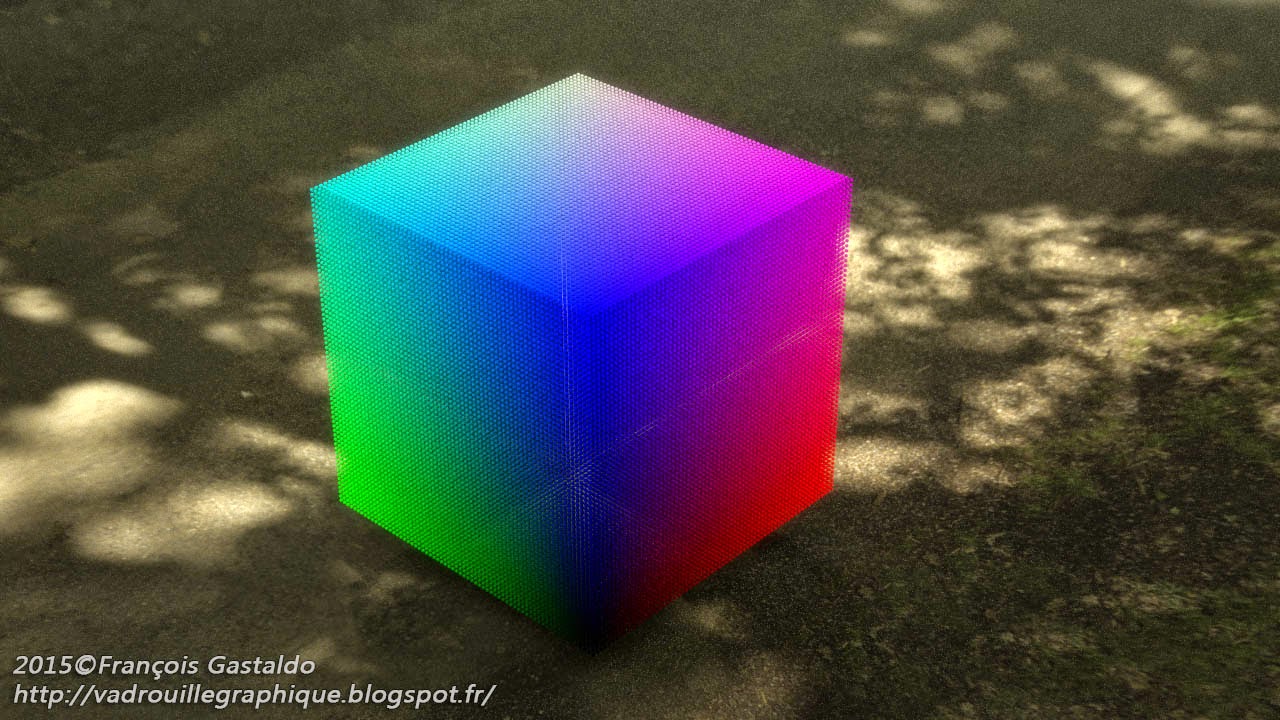
FOSPHORE_RGB turn any object in an RGB Cube made of spheres, thousands or even millions of spheres if you want!
FOSPHORE_RGB just need a 6 polygones cube to let you explore the RGB Cube!
It’s an OSL Shader.
No sphere is really created, and no memory is used.
The current version is not yet releasable. There are still some adjustments to do to let you play with it without unexpected results.
But the first results are amazing!!!


FOSPHORE_RGB turn any object in an RGB Cube made of spheres, thousands or even millions of spheres if you want!
FOSPHORE_RGB just need a 6 polygones cube to let you explore the RGB Cube!
It’s an OSL Shader.
No sphere is really created, and no memory is used.
The current version is not yet releasable. There are still some adjustments to do to let you play with it without unexpected results.
But the first results are amazing!!!


2015/05/16
FOSPHORE First look !
FOSPHORE is an OSL Project made for education.
FORSPHORE is for:
Full Of SPHere On REndering
The goal is to make some shaders using ‘in shader sphere rendering’.
Those Open Shading Language shaders convert any object to a bunch of spheres! With them, you can have a 6 polygones cube looking like one million spheres at rendering time, with no RAM overload.
This is purely shading: no particule, no molecular nor granular plugins. Just apply the shader to your object to turn it to thousands of spheres.
The main interest of those shader is education! They are not yet Production Ready Shaders!
The speed of those shaders is not so smaller than converting object to real sphere particules.
The granular tests made with Softimage ICE are even faster! (But it is Softimage ICE… Rest In Peace Softy)
In this post, you can see the first results of FOSPHORE_FILL.
This first shader fills an object with spheres of chosen size and space.
You can randomly change size, place, color… It’s also possible to animate the noise and the spheres.
There is no limits to the number of spheres, and you could have thousands and thousands spheres in your object!
Unfortunately, the shader is not yet to be released. There are still some bugs, and some optimization is needed. I also have to make it to work correctly with VRay.
Enjoy!


2015/02/07
2014/09/16
'OSL Shader Writing with compatibility in mind' workshop in Amsterdam!
Don't miss my workshop at the Blender Conference 2014, from 24 to 36 October, in Amsterdam!
'OSL Shader Writing with compatibility in mind'
I'll make a course / workshop about OSL compatibility between renderers and how to get the most of OSL on a multi-renderers production.
I'll talk about :
- OSL Implementation differences,
- Texture Shaders
- Materials Shaders
- 100% OSL shading
- Solution to be compatible between renderers
Examples of OSL shading from Cycles to Appleseed and VRay will be shown.
More information about the presentation Here.
....
2014/07/31
New Versions of GAO and GAO2 Ambient Occlusion !
Someone of you asked me why GAO is not working on Blender 2.71.
Unfortunately, the bug is not from GAO, so I can’t fix it! The OSL ‘Trace’ Function is bugging on some version of Blender 2.71.x.
Indeed, GAO and GAO2 are working perfectly on the Official Blender 2.71. You can download Blender 2.71 here.
So, I decided to clean up and make GAO ever Better!
What’s new in GAO 1.1 !
1. Closure Ouput now use Input colors! It’s now possible to have colored or even textured Ambient Occlusion
2. New Oversampling function. It adjusts the quality of your AO independently from scene sampling. It’s also possible to have better AO on some object and basic one on others.
3. New Gamma display! GAO is definitively the smoothest Ambient Occlusion! The gamma allows making it smoother or looking more like a true lighting effect.
All new GAO2.1 !
A completely rewritten of the most popular GAO2 by BAO2 from BlenderArtist Forum !
It includes all new things from GAO1.1 with the typical functions of GAO2 added:
1. AO angle in degrees.
2. 3 modes: 1 = Standard AO, 2 = Inverted Normal AO (wear), 3 = both.
3. Inverted Effect that swap the In and the Hit inputs.
The Indirect Illumination option is not yet implemented, sorry.
Download GAO1.1 Ambient Occlusion
Download GAO2.1 Advanced Ambient Occlusion
AND, very very big news : GAO2 for VRay 3.0 !
You have to use it with the VRayOSLMtl !
There is just one material output (no map color only output).
There is just one function different from GAO2 generic OSL :
UseTexture checkbox : when OFF, GAO2 use the color input. When ON, it use the map inputs.
Download GAO2.1 for VRAY 3 ready to use .oso file
Download GAO2.1 for VRAY 3 .OSL source code
Enjoy!


Unfortunately, the bug is not from GAO, so I can’t fix it! The OSL ‘Trace’ Function is bugging on some version of Blender 2.71.x.
Indeed, GAO and GAO2 are working perfectly on the Official Blender 2.71. You can download Blender 2.71 here.
So, I decided to clean up and make GAO ever Better!
What’s new in GAO 1.1 !
1. Closure Ouput now use Input colors! It’s now possible to have colored or even textured Ambient Occlusion
2. New Oversampling function. It adjusts the quality of your AO independently from scene sampling. It’s also possible to have better AO on some object and basic one on others.
3. New Gamma display! GAO is definitively the smoothest Ambient Occlusion! The gamma allows making it smoother or looking more like a true lighting effect.
All new GAO2.1 !
A completely rewritten of the most popular GAO2 by BAO2 from BlenderArtist Forum !
It includes all new things from GAO1.1 with the typical functions of GAO2 added:
1. AO angle in degrees.
2. 3 modes: 1 = Standard AO, 2 = Inverted Normal AO (wear), 3 = both.
3. Inverted Effect that swap the In and the Hit inputs.
The Indirect Illumination option is not yet implemented, sorry.
Download GAO1.1 Ambient Occlusion
Download GAO2.1 Advanced Ambient Occlusion
AND, very very big news : GAO2 for VRay 3.0 !
You have to use it with the VRayOSLMtl !
There is just one material output (no map color only output).
There is just one function different from GAO2 generic OSL :
UseTexture checkbox : when OFF, GAO2 use the color input. When ON, it use the map inputs.
Download GAO2.1 for VRAY 3 ready to use .oso file
Download GAO2.1 for VRAY 3 .OSL source code
Enjoy!


2014/03/01
Fast Multi Channel Ambient Occlusion
First, Welcome VRay to OSL World !
To celebrate Chaosgroup VRay entering the OSL world, with it's 3.0 version, here is a Three Ambient Occlusion for the price of One !
This shader is an Ambient Occlusion, but it does what a lot of you already do by hand: put 3 different AO, each on a different color channel.
Then, you just have to sepparate RGB channels with you favorite compositing software. The main advantage of this shader is that it optimaze rendering time by do not triple shading.
There is two versions of the shader :
TriGAOVr.osl : it's 100% Vray 3.0 compliant version !
and
TriGAO.osl : this version is for renderer implementing the 'getmessage' OSL functionnality, like Cycles or SpectraStudio.
It is about 30% faster, as it tracing just one ray for the three AO. It has a smoother AO gradient, needing less AntiAlias.
Small Documentation :
AO Angle : Occlusion search angle in RADIAN, 1.0 = 180° AO search.
Maxdistance : Limit of distance of occluding object.
The smallest it is, the smallest scene detail are highlithed by AO.
If there is Green and Blue AO, Maxdistance is for RED only.
GreenAODistance : Limit of distance of occluding object for GREEN channel.
BlueAODistance : Limit of distance of occluding object for BLUE channel.
OverSampling : multiply the number AO ray rendered.
doing 5 render samples with 10 OverSampling AO rays is faster than doing 50 render sampling with no Oversampmling.
The TriGAO.osl version has no checkbox for Green and Blue AO. Disable them with 0.0 value.
The TriGAOVr.osl has a BoostExposure control to compensate Render Exposure Control.
DOWNLOAD :
For Vray, or any renderer, you can download TriGAOVr.osl here.
Or TriGAOVr.oso, ready to use, version here.
For Cycles and other renderers using 'getmessage', download the TriGAO.osl version here.
Inscription à :
Articles (Atom)